
A BOM in electronics is a bill of materials: a structured list of the parts needed to build a board, assembly, or finished product. For buyers, it connects the engineering design with the components that must be ordered.
A useful BOM tells a supplier which part is required, how many are needed, and which requirements must remain unchanged. Missing manufacturer names, incomplete part numbers, or unclear quantities can lead to a quotation that looks acceptable but does not match the intended build.
This guide explains how to read an electronics BOM, prepare it for quotations, and check the parts before placing an order.
What Is a BOM in Electronics?
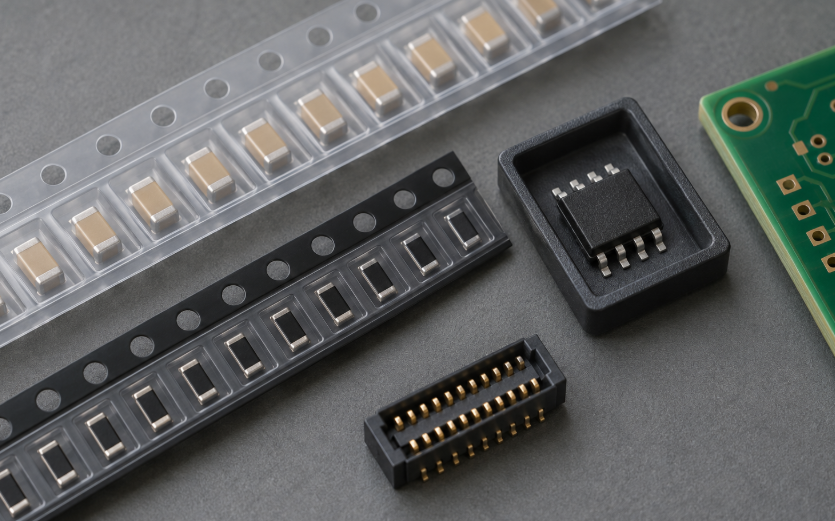
For a printed circuit board assembly, the BOM lists components such as resistors, capacitors, integrated circuits, and connectors. A product-level BOM may also include the bare board, cables, enclosure, fasteners, and subassemblies. Confirm which level the supplier is being asked to quote.
Engineering uses the BOM to document the approved design. Purchasing uses it to identify components and plan orders. The assembly team uses it alongside manufacturing files to determine which parts belong in each position.
One BOM row can cover several locations using the same approved part. For example, R1, R2, and R3 may share one resistor line with a quantity of three per board. The reference designators identify positions; the manufacturer part number identifies the part to purchase.
Before requesting quotations, confirm the assembly name, revision, and build variant. A supplier should work from the version released for the intended production run.
What Information Should an Electronics BOM Include?
The following fields provide a practical starting point. Add project-specific requirements where needed.
| Field | What to record | Why the buyer needs it |
|---|---|---|
| Item or internal part number | Your controlled line or component identifier | Keeps quotes and changes tied to the correct item |
| Manufacturer and MPN | Manufacturer name and complete manufacturer part number | Identifies the requested orderable component |
| Description and specifications | Component type, value, and relevant ratings | Helps detect obvious matching errors |
| Package or footprint | Physical package and applicable dimensional detail | Helps engineering verify the PCB fit |
| Reference designators | Board positions such as R1-R3 or U1 | Connects the line to the assembly design |
| Quantity per assembly | Number fitted to one board or product | Supports the build calculation |
| Fitment status | Fitted or DNP, with the applicable variant | Prevents purchasing parts that are intentionally omitted |
| Alternativas aprobadas | Exact approved MPNs or a controlled list reference | Defines the permitted substitution scope |
| Procurement notes | Packaging, required delivery, lot/date-code restrictions, documents | Makes quote conditions explicit |
Keep the BOM revision, assembly identifier, and release date in the document header or another controlled location. If a distributor SKU is included, give it a separate column from the MPN.
A description such as “10 kΩ resistor” is useful for checking a line, but may leave package size, tolerance, power rating, and other requirements unresolved. Use an approved MPN or a sufficiently detailed, engineering-controlled specification.
Altium’s BOM documentation distinguishes manufacturer and supplier part information and includes production quantity in the sourcing workflow. Keeping these fields separate makes automated matching easier to review.
How Do You Read a BOM? A Simple Example
Suppose an illustrative controller board has the following simplified BOM. The internal identifiers below are teaching examples, not manufacturer part numbers or a purchasable design.
| Internal item | Reference designators | Descripción | Qty per board | Fitment | Base demand for 100 boards |
|---|---|---|---|---|---|
| RES-001 | R1, R2, R3 | Approved resistor | 3 | Fitted | 300 |
| CAP-001 | C1, C2 | Approved capacitor | 2 | Fitted | 200 |
| IC-001 | U1 | Approved controller IC | 1 | Fitted | 100 |
| CON-001 | J1 | Approved connector | 1 | Fitted | 100 |
| RES-002 | R4 | Optional resistor | 1 position | DNP | 0 |
Read each line in three stages. First, identify the component and look up its approved manufacturer and MPN. Next, check where it is fitted. Finally, multiply the fitted quantity per board by the number of boards to be built.
In this example, three RES-001 resistors per board multiplied by 100 boards gives a base demand of 300 pieces. R4 is marked DNP, meaning “do not populate,” so it contributes no fitted demand for this variant.
The final order quantity may differ from base demand. Existing usable stock, assembly losses, setup needs, spares, minimum orders, and packaging multiples can affect it. Agree on these adjustments with the production team rather than adding the same overage to every line.
DigiKey’s BOM help describes assembly multiplication and planned overages as separate functions. Keep those calculations separate in a manual spreadsheet too.
How Do You Prepare a BOM for Supplier Quotes?
Start with the released BOM. Export a readable spreadsheet or CSV, preserve part numbers as text, and check that punctuation, leading zeros, and suffixes have survived the export. Keep one component line per row and place notes in dedicated columns. Use the IC RFQ checklist to check the quotation request before sending it to suppliers.
Include both the quantity per assembly and the total requested quantity, with clear column headings. State the build quantity, required delivery date, and whether partial deliveries are acceptable. Distinguish the date parts must arrive from the date a supplier expects to ship them.
Review the MPN column for blanks, shortened family names, and distributor codes entered by mistake. A missing suffix may change packaging or another ordering characteristic; its meaning depends on the manufacturer. Resolve uncertain entries before issuing the RFQ. For a closer review of ordering codes and suffixes, follow the part number verification guide.
Make Quote Exceptions Easy to See
Ask suppliers to return a line-by-line response showing the offered manufacturer, full MPN, quantity, packaging, availability basis, and delivery estimate. Any deviation should appear beside the affected line.
Separate an exact match, an already approved alternate, and a newly proposed substitute. A supplier’s suggestion should remain pending until the responsible engineer approves it.
If a line is unavailable, request an explicit response rather than allowing it to disappear from the quotation. A nearly complete BOM can still leave production waiting for one essential component.
Record the quote date and validity, and reconfirm availability when placing the order. A spreadsheet stock entry alone does not establish that the parts are reserved for your build. Once the file is ready, our complete BOM procurement guide covers the next steps: evaluating suppliers, reviewing offers, planning delivery, and controlling approved alternatives.
What Should Buyers Check Before Ordering BOM Components?
Review the actual offer against the released BOM. Focus on component identity, delivery evidence, and any conditions that could change the purchasing decision.
| Check | Evidence to request or review | When to pause the order |
|---|---|---|
| Exact component match | Manufacturer, full MPN, datasheet, and quote line | An unexplained suffix, package, or grade differs |
| Stock and delivery | Whether stock is on hand or supplier-held; confirmed quantity and schedule | A listing is presented as confirmed stock without clarification |
| Packaging and handling | Reel/tray/tube/cut-tape format; applicable ESD and moisture requirements | Offered packaging conflicts with assembly or handling needs |
| Lot and source records | Available label photos, lot/date information, and provenance documents | Agreed lot restrictions or source requirements cannot be met |
| Documentation and terms | Required declarations, inspection scope, acceptance and return conditions | Required evidence is missing or acceptance terms remain unresolved |
The inspection plan should match the component and application risk. Label photos and a visual check can reveal inconsistencies, but they do not establish complete authenticity or electrical performance. If testing is required, agree on the scope, sampling, acceptance criteria, and responsibility before buying.
For overseas projects, state the destination and the customer’s documentation requirements. Ask for applicable RoHS or REACH information for the exact offered part where required; a generic supplier statement may not answer the project’s needs. Finished-product compliance still requires a separate assessment.
Date-code limits should come from customer requirements, manufacturer guidance, or a documented quality decision. Age alone is an incomplete basis for accepting or rejecting a component. Packaging condition, storage history, and applicable handling requirements also deserve review.
At receiving, compare the shipment with the purchase order and agreed evidence. Hold mismatched items for clarification before releasing them to production.
How Do You Handle Unavailable or Obsolete Parts in a BOM?
Begin by separating a supply problem from a lifecycle problem. An active part may be difficult to obtain, while an obsolete part may still be offered from remaining inventory. Check the manufacturer’s status and notices for the requested device.
Texas Instruments’ lifecycle definitions distinguish active, not recommended for new designs, last-time-buy, and obsolete products. TI describes obsolete products as no longer in production. Use the relevant manufacturer’s own definitions and discontinuance notice when planning an order.
For a shortage, first check approved sources, approved alternates, and whether the delivery schedule can change. Treat an offer from an additional source as a separate qualification decision, with evidence requirements appropriate to the application.
Review Alternatives with Engineering
Compare the proposed substitute with the original part’s electrical limits, package dimensions, pinout, thermal behavior, operating conditions, and qualification requirements. Programmable or software-dependent devices may need firmware and toolchain review as well.
A matching package or similar headline specification is insufficient for approval. Engineering should record the evaluation and any required validation. Purchasing can then use the approved MPN under a controlled BOM revision or approved alternate list.
For an obsolete device, compare remaining-stock sourcing with redesign and any valid last-time-buy opportunity. Base that decision on forecast demand, service obligations, storage needs, evidence, and qualification effort.
DuoLink’s guide to sourcing obsolete electronic components provides further purchasing checks for older or hard-to-find parts.
How Can DuoLink Electronics Help with BOM Sourcing?
DuoLink Electronics is an independent electronic-component supplier. Its BOM sourcing service covers inquiries for ICs, semiconductors, passive components, connectors, and hard-to-find parts based on specifications, quantities, and delivery needs.
Submit a released BOM with complete MPNs and manufacturer names. Include the requested quantities, delivery destination, required arrival date, and relevant packaging, date-code, traceability, or documentation requirements.
Identify lines where approved alternatives are allowed. For other lines, request an exact match and have any proposed substitute listed separately for engineering review. Confirm availability and the evidence available for each offered lot before ordering.
You can send DuoLink a BOM or component RFQ to discuss the sourcing request. Application suitability and substitute approval remain with your engineering and quality teams.

Conclusión
A BOM in electronics gives buyers a controlled starting point for component purchasing. It identifies the approved parts and separates fitted quantities from total demand. It also records permitted substitutions and purchasing conditions.
Before issuing a purchase order, reconcile the supplier’s response with the released BOM and resolve every exception. DuoLink Electronics can support BOM sourcing inquiries when you provide the part numbers, quantities, delivery needs, and required evidence.
Preguntas frecuentes
Is a BOM the Same as a Parts List?
A BOM is a structured parts list tied to an assembly or product. A procurement-ready BOM also records controlled part identities, quantities, fitment status, and revision information.
What Is the Difference Between an MPN and a Distributor Part Number?
An MPN identifies the manufacturer’s component. A distributor part number identifies the seller’s catalog entry. Keep both in separate columns and verify that the catalog entry matches the approved MPN and packaging.
Does BOM Quantity Mean Quantity per Board or Total Order Quantity?
It can mean either, depending on the file. Label the columns explicitly. Calculate fitted demand from quantity per assembly and build quantity, then account separately for usable stock, agreed overages, and order constraints.
Does a BOM in Electronics Prove That the Parts Are Genuine?
No. A BOM documents what the design requires. Authenticity assessment depends on the offered parts, their source records, and appropriate inspection or testing. The BOM alone provides no such evidence.
References
- Altium; Creating the BOM Document
- Altium / Octopart; Key Elements of a PCB BOM
- DigiKey; Build and Maintain a Bill of Materials
- Texas Instruments; Product Life Cycle


 Spanish
 English
 German
 French
 Chinese
 Italian