Choosing between Intel and AMD is not a brand preference exercise. For a purchasing team, the useful comparison starts with the required platform: the workload, motherboard or server design, memory and I/O needs, power envelope, lifecycle requirement, and the exact processor orderable part number.
Both companies supply x86 processors for PCs, workstations, servers, and embedded systems. A processor that performs well in a desktop benchmark may still be the wrong choice for a 24/7 industrial controller or a validated server platform. This guide compares Intel vs AMD by application, then explains the evidence to request before placing a purchase order.
Intel vs AMD: What are the main differences?
Intel and AMD have broad product families rather than one universal CPU line. Intel’s current portfolio includes Intel Core and Core Ultra client processors, Xeon for servers and workstations, and purpose-built embedded or edge offerings. AMD’s portfolio includes Ryzen, Ryzen PRO, Threadripper and Threadripper PRO, EPYC, and Ryzen or EPYC Embedded families. Use the manufacturer’s current product page and datasheet for the specific SKU, not a family name alone.
The practical differences usually fall into five questions:
| Selection area | What to compare | Why it matters to buyers |
|---|---|---|
| Platform compatibility | Socket, chipset, BIOS, memory type, PCIe generation, board revision | A processor can be electrically incompatible even when the family name looks similar. |
| Compute profile | Core layout, thread count, clock behavior, cache, accelerator features | The best option depends on whether the load is lightly threaded, parallel, memory-bound, or I/O-bound. |
| Graphics and AI features | Integrated graphics, NPU availability, media engines, discrete GPU requirement | These features can change system BOM cost and thermal design. |
| System constraints | Power limits, cooling, rack density, memory capacity, PCIe lanes | Processor selection affects the chassis, power supply, cooling, board, and qualification plan. |
| Product continuity | Lifecycle status, PCNs, firmware support, embedded longevity | Long-lived products need a controlled revision and supply plan. |
At the client level, Intel often uses hybrid designs that combine Performance-cores and Efficient-cores in selected families. AMD has different tiers for consumer, commercial, workstation, server, and embedded use. Neither architecture label tells the full story. Check the exact processor’s core count, supported memory, PCIe configuration, integrated graphics, and operating conditions in Intel ARK or the relevant AMD product page.
For procurement, a useful rule is simple: compare validated systems and exact processor codes, not only Intel Core versus AMD Ryzen or Xeon versus EPYC. The same processor family can include desktop, mobile, tray, retail, low-power, unlocked, embedded, and different stepping variants.
Intel vs AMD for desktop and laptop applications
Desktop and laptop buyers usually balance interactive performance, battery life or power draw, graphics capability, cooling, and total platform cost. Intel Core and Core Ultra processors are common across commercial laptops and desktops. AMD Ryzen and Ryzen PRO processors cover consumer and commercial systems, with some models combining CPU cores and integrated Radeon graphics.
For office PCs, POS terminals, engineering laptops, and compact workstations, begin with the software stack. Confirm operating-system support, virtualization needs, codec or media requirements, graphics output configuration, and memory capacity. A laptop CPU cannot be evaluated as a desktop replacement because its manufacturer-configured power limits, cooling assembly, and memory layout can differ greatly.
| Demande | Useful processor-screening criteria | Verification before release |
|---|---|---|
| Business laptop fleet | vPro or PRO management requirement, battery target, Wi-Fi platform, dock compatibility | Verify the OEM configuration and firmware support, not the CPU alone. |
| Desktop productivity PC | core count, integrated graphics, DDR4 or DDR5 support, motherboard BIOS | Match the processor stepping and board BIOS revision. |
| Content creation PC | application benchmark, RAM capacity, GPU pairing, storage lanes, sustained cooling | Test the actual software workload with the selected GPU and memory. |
| Small-form-factor system | thermal design power range, cooler height, PSU capacity, I/O | Validate sustained load temperature in the final enclosure. |
For a commercial build, the processor is only one item in the compatibility chain. Request the board model, BIOS release, supported memory list, cooler specification, and power limits from the system builder. If the order is for individual CPUs, specify whether retail-box or tray packaging is acceptable. Retail and tray parts can have different warranty routes and packaging, even when the processor model is the same.
Intel vs AMD for workstations and professional computing
Professional systems need more than peak benchmark results. CAD, rendering, simulation, video production, EDA, software compilation, and local AI workloads can place different demands on CPU cores, memory capacity, ECC support, PCIe connectivity, GPU count, and validated drivers.
Intel Xeon workstation platforms and AMD Ryzen Threadripper or Threadripper PRO families are generally considered when a standard desktop platform cannot provide the needed memory, I/O, or professional platform features. The correct choice depends on the application certification list, the number and type of expansion cards, and the workload’s scaling behavior.
Ask engineering to classify the workload before sourcing. A CAD workstation that spends most of its time in a lightly threaded interactive application can value frequency and application certification. A rendering or simulation node may benefit more from parallel compute, memory bandwidth, and available PCIe lanes. An AI workstation also requires the CPU, GPU, memory, storage, and networking plan to work as a system.
Do not treat a processor replacement as a drop-in upgrade. Socket compatibility is only the first check. Confirm chipset support, memory population rules, ECC requirements, GPU clearance and lane allocation, power delivery, cooling, operating system, and application vendor guidance. Engineering approval should cover form, fit, function, firmware, and qualification risk before a substitute is purchased.
Intel vs AMD for servers and data centers
Server comparisons are often framed as Intel Xeon versus AMD EPYC. That is a valid starting point, but a server CPU must be selected at the platform level. Core density, memory channels and capacity, PCIe lanes, accelerator support, networking, storage topology, rack power, and software licensing can matter more than one benchmark score.
AMD describes EPYC as a server processor family for cloud, enterprise, and high-performance computing applications. Intel provides Xeon platforms for data center workloads. Both vendors publish SKU-level specifications and platform documentation. Check the precise generation and server board support because the socket and memory architecture can change between generations.
For virtualization, database, storage, cloud, and GPU-server deployments, create a workload sheet with the following fields before requesting a quote:
- Required VM count or application throughput, with expected utilization.
- Memory capacity, DIMM type, population plan, and error-correction requirements.
- PCIe lane allocation for GPUs, NICs, NVMe storage, RAID or HBA cards, and accelerators.
- Rack power limit, cooling capability, redundancy policy, and operating temperature.
- Software licensing model, operating system support, hypervisor version, and firmware management requirements.
- Approved server vendor or motherboard platform, processor stepping, and BIOS baseline.
Server procurement also needs a longer lifecycle view. Check product status, security advisories, microcode or BIOS dependencies, warranty channel, and availability of matched spare processors. A mixed server fleet may use more energy and management effort if firmware, DIMM, cooling, or operating-system validation differs across nodes.
Intel vs AMD for embedded, industrial, and edge applications
Industrial and edge projects should not select processors solely from desktop product pages. Long-term availability, temperature range, soldered versus socketed package, operating system image, I/O, cybersecurity maintenance, mechanical design, and field-service policy often decide the appropriate family.
Intel offers products and programs for embedded and edge platforms. AMD’s Ryzen Embedded et EPYC Embedded families target uses such as industrial PCs, networking, storage, edge servers, and machine vision. Product lifecycle and support terms vary by family and SKU, so request the manufacturer’s current embedded product brief and lifecycle statement.
For an industrial PC or edge controller, check these items early:
- The exact operating temperature and cooling design. A CPU rating does not validate the complete enclosure.
- Required I/O: Ethernet, PCIe, USB, serial interfaces, camera interfaces, storage, and fieldbus hardware.
- Operating system image, driver support, remote-management approach, and cybersecurity update ownership.
- Memory type, ECC requirement, storage endurance, and behavior after power interruption.
- Processor roadmap, last-order policy, and approved alternative process.
If the processor is soldered onto a board, replacement involves a board-level sourcing and requalification decision. If it is socketed, still verify the board revision, BIOS, socket, heatsink retention hardware, and thermal solution. For regulated equipment, the end product may require additional documentation or validation beyond the processor’s own data.
How to choose between Intel and AMD for your application
Use a short technical and commercial review rather than a generic winner. The table below is a practical way to organize it.
| Decision step | Questions for engineering and procurement |
|---|---|
| Define the application | What software, operating system, workload type, availability target, and deployment environment apply? |
| Fix the platform | Which motherboard, server, embedded board, memory, cooling, and expansion cards are approved? |
| Compare exact SKUs | Which orderable part number, stepping, socket, power class, package, and lifecycle status are required? |
| Check total system impact | Does the change affect DIMMs, cooling, PSU, GPU topology, BIOS, certifications, or software licensing? |
| Validate supply risk | Is the item active, in stock, allocated, NRND, or obsolete? Is one lot or a date-code range required? |
| Approve the purchase | Does the supplier provide the required photos, documents, packaging condition, and terms before shipment? |
For a new desktop or laptop design, compare the finished OEM system. For a workstation or server, model the workload and validate the system configuration. For embedded systems, prioritize lifecycle, thermal behavior, I/O, and software maintenance. This method produces a defensible selection even when Intel and AMD options both meet the headline performance target.
How to source Intel and AMD processors safely
Processors are high-value parts, and sourcing risk rises when a product is older, short in the market, offered outside its normal channel, or described with incomplete part information. An independent supplier can support hard-to-find requirements, but it should not be described as manufacturer-authorized unless the manufacturer confirms that status.
Send the full manufacturer orderable part number, quantity, acceptable date-code range, packaging requirement, target application, and any documentation requirement with the RFQ. Ask whether the stock is physically on hand, supplier-held, or subject to confirmation. Product listings alone do not confirm current availability or condition.
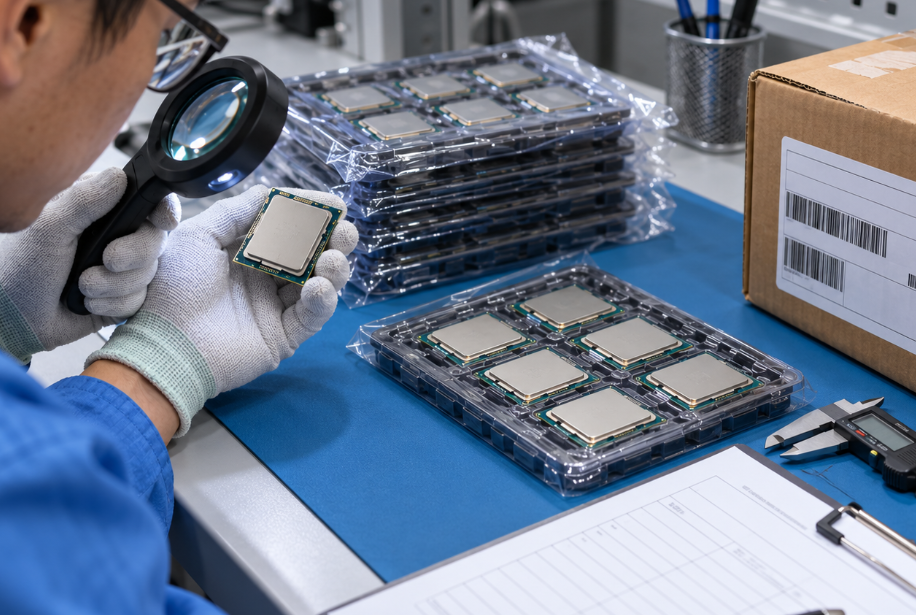
Before release, request clear photos of the processor top marking, substrate or contact side where appropriate, tray or retail packaging, external labels, quantity, and lot information. Compare these with official manufacturer references for the exact product. Marking or packaging inconsistencies are screening signals, not proof by themselves. Quarantine a mismatch until the supplier can explain it and the required inspection level is agreed.
| Evidence request | Ce que cela permet de confirmer | Limit |
|---|---|---|
| Exact part number and revision | Match against the approved BOM and manufacturer record | Does not prove product condition or chain of custody. |
| Packaging and label photos | Package type, quantity, visible lot or date-code consistency | Photos can not replace receiving inspection. |
| Traceability or quality documents | Documented source and stated lot information | Scope and authenticity of documents must be reviewed. |
| Pre-shipment inspection agreement | Visual, packaging, dimensional, or test scope | The method, sample size, and acceptance criteria must be agreed in writing. |
| Receiving inspection plan | What your team will check on arrival | Does not replace engineering qualification for a critical application. |
At receiving, keep lots separated until inspection is complete. Record packaging condition, labels, quantity, date codes, and visible mechanical condition. Apply ESD-safe handling. For critical applications, agree in advance on the inspection method, sample size, laboratory requirements, and whether any testing is destructive. Electrical or functional test results should be interpreted against the approved manufacturer specification and system requirements. For a fuller date-code review process, see Comment vérifier le code de date des composants électroniques.
DuoLink Electronics is an independent electronic-component supplier. For Intel and AMD processor requirements, you can submit the exact part number, manufacturer, quantity, required date code, target platform, and documentation needs through its part-number lookup or inventory inquiry channel. Availability, condition, documents, and suitability should be confirmed for each order before release.
Conclusion
The Intel vs AMD decision should follow the application and platform, not a broad brand ranking. Desktop and laptop projects need OEM configuration checks. Workstations and servers need workload, memory, I/O, and validation planning. Embedded systems need lifecycle, thermal, and software support review. Once engineering selects an exact SKU, procurement can control risk by confirming part identity, platform compatibility, packaging, lot information, documents, and inspection scope before shipment.
Foire aux questions
Is Intel or AMD better for a server?
Neither is automatically better. Compare the exact Xeon or EPYC SKU within an approved server platform, then evaluate core needs, memory capacity, PCIe allocation, power, cooling, software licensing, and firmware support.
Can I replace an Intel processor with an AMD processor on the same motherboard?
Usually no. Intel and AMD processors use different sockets and chipsets. Even within one vendor, motherboard BIOS and board revision can restrict support. Confirm the approved CPU support list for the exact board.
Do processor date codes need to match?
That depends on the application and internal quality policy. Some buyers accept a controlled date-code range, while others require one lot or a narrow range for matched production builds. State the requirement in the RFQ before quotation.
Does original packaging prove a processor is authentic?
No. Packaging, labels, and markings are useful screening points but are not conclusive proof alone. Use a risk-based process that combines supplier qualification, document review, inspection, and testing when required.

 French
  English
  German
  Spanish
  Chinese
  Italian